This page is public: anyone who can reach the server can read it, so it holds no secrets. Using the tools still requires signing in.
What this is
An MCP server that gives Claude (and other MCP clients) access to the Trison Spaces digital signage platform: organisations, places, content and catalogues. Ask Claude things like "which places in this org are offline?" or "what content is tagged menu?" and it calls the tools listed below.
It is read-only: it can look things up, but it can't create, change or delete anything in Si9n.
Getting access
You need a login in the team's Cognito user pool, and that user must be in the access group. Ask the server's admin to add you. Without it, login succeeds but every request is refused (401).
Connecting
The server URL is:
https://mcp-server.zero-in.com/mcp
claude.ai (recommended)
The easiest way in. You set it up once on claude.ai and the connector is then available everywhere you use Claude: web, Desktop and mobile.
- Open Settings → Connectors and click Add custom connector.
- Give it a name (for example Si9n) and paste the server URL above.
- Open Advanced settings, enter the OAuth Client ID the admin gives you, and leave the client secret blank.
- Click Add, then Connect, and sign in with your Si9n MCP login.
- In a chat, open the + menu → Connectors and make sure Si9n is switched on. Then just ask, e.g. "which places in this org are offline?"
Allowing tools to run
By default Claude asks for your permission before calling a connector's tools, so the first questions in a chat will show an Allow prompt. You can answer it each time, or set it once per tool:
- Go to Settings → Connectors and click Configure next to Si9n.
- Under Tool permissions, pick one of these for each tool (or for all of them at once):
- Always allow: Claude calls the tool without asking.
- Needs approval: Claude asks you every time.
- Blocked: Claude can't use the tool at all.
Because every tool on this server is read-only, setting them all to Always allow is safe and makes conversations much smoother. Block any tool you'd rather Claude didn't use.
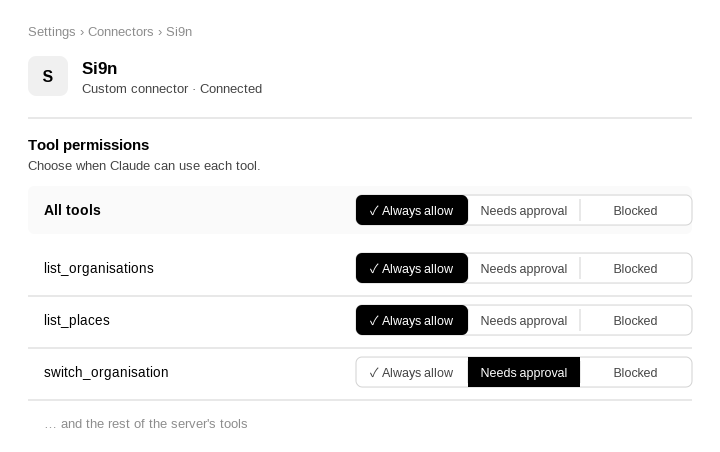
Illustration only: labels and layout in claude.ai may differ slightly.
Other clients
Claude Code:
claude mcp add --transport http --callback-port 8091 si9n https://mcp-server.zero-in.com/mcp
Then run /mcp inside Claude Code, pick si9n and sign in.
VS Code + GitHub Copilot: add the server URL as an HTTP MCP server, and sign in when prompted.
If sign-in fails with redirect_mismatch, your client's callback URL isn't registered yet. Tell the admin which client you're using.
Organisations
The Si9n account behind this server can see 100+ client organisations. Each person has their own current organisation: switching it (ask Claude to "switch to <org>") only affects your session, never anyone else's. If results look empty, check which org you're in first.
Good to know
- Secrets are filtered out. Passwords, keys, tokens and device IPs/MACs/serial numbers are removed from every result before Claude sees them.
- Usage is logged. Each tool call is recorded (who, which tool, which org, success or error, how long it took) so admins can see how the server is used. Tool arguments and results are never logged. Logs are kept 90 days.
- There's a rate limit. Requests to the Si9n API are capped across everyone, so big questions spanning many orgs or places can be slow.
Problems or ideas
Contact the server's admin. The changelog at the bottom of this page lists what changed in each update.
Tools
16 tools available. This server is read-only: none of them create, change or delete anything in Si9n.
get_catalogue_inventoryList the menus and items assigned to a place within this Catalogue.
get_catalogue_resourceGet full details of a single entity by id. See list_catalogue_resources for namespace/resource values.
get_contentGet full details of a content item.
includecan contain 'folder', 'inventory', 'notes'.get_content_usageList the devices and other content items that reference this content item.
get_current_organisationReturn the currently active organisation. No API call — prefer this over list_organisations just to check "where am I" (returns None until this session's first Si9n call).
get_placeGet full details of a place.
includecan contain 'devices', 'displays', 'mapData', 'offline', 'notes'.get_place_logsList archived log files for a place.
monthis yyyy-mm, defaults to the current month.get_usage_logAdmin only. Who has been using this server: live sessions, per-person/tool/org counts, MCP clients, denied logins, and the most recent calls.
hoursis how far back to look (max 2160);personis a Cognito user id andtoolan exact tool name;orgmatches an org name or uuid;limitcaps the recent calls (max 200). People are identified by Cognito user id. A "session" is one MCP session, or - for clients that don't keep MCP sessions - one person's shared state.list_catalogue_resourcesList entities of one resource type within a Catalogue or Feed.
namespace: "catalogues" or "feeds". resource: for catalogues one of brands, types, categories, items, pricelists, attributes, menus, schedules. For feeds one of items, attributes. filters: resource-specific query filters passed straight through, e.g. catalogues/items supports ids, q, tagged, categories, brands, types, diet, allergens, excludeAllergens, active; feeds/items supports ids, q, tagged, date, from, to, active. List values are comma-joined automatically. See swagger.yaml for the full filter list per resource.
list_contentList content items.
deleted: include soft-deleted content in the results.includecan contain 'inventory', 'notes', 'deleted'.list_organisationsList organisations available to this account, and which one is active now.
organisationis the active org, with its features, meta, partner, permissions and teams;organisationsis the full switchable list, each with auuidto pass to switch_organisation.list_placesList places.
parentid: all children of a parent place id ('0' for top level).includecan contain 'image', 'map', 'notes'.switch_organisationSwitch which organisation subsequent tool calls operate against.
org_uuidmust come from list_organisations. Mints a new token scoped to that org — every later tool call in this session acts on the new org until you switch again. Applies to this session only (a client without MCP sessions: to your account only); other people are never affected. Returns the org now active.
Changelog
User-facing changes to the Si9n MCP server, newest first. Add an entry here with every update you deploy; the docs page shows this file.
0.1.0 — 2026-10-26
First version.
- Read-only tools for organisations, places, content and catalogues. Nothing can be created, changed or deleted in Si9n through this server; make those changes in the Si9n UI.
- Sign-in through the team's Cognito login (OAuth). Access is granted by membership of a Cognito group.
- Each person has their own Si9n session and current organisation.
- Usage log: admins can see who uses the server, with which tools and orgs, through the admin-only
get_usage_logtool. - This docs page, at
/docs.